Free crosshair editor · Windows
Custom Crosshair Maker for Any PC Game
Design a custom crosshair layer by layer in the free app, then save it as a loadout you can switch mid-match.
How the layer editor works
- Step 1 Add one layer per shape.
- Step 2 Tune opacity, blur, and rotation per layer.
- Step 3 Order layers on the Layer tab.
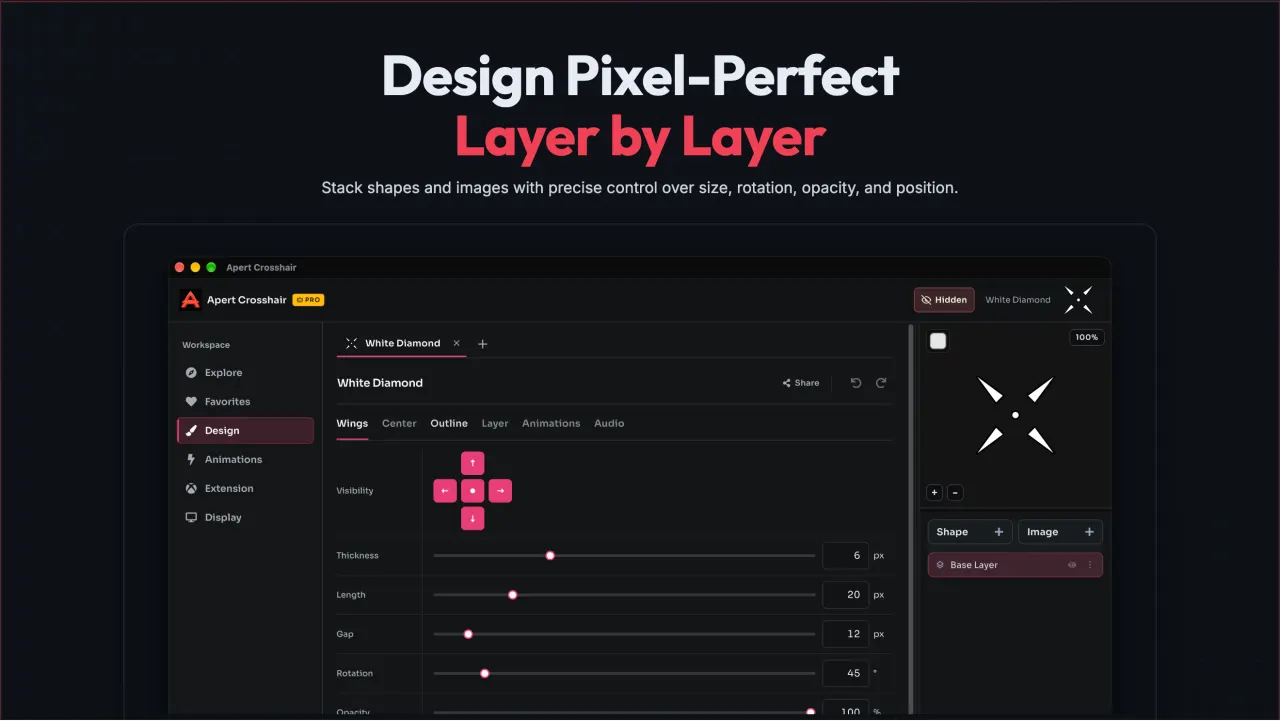
Four tabs, each with one job
- Wings tab.
- Center tab.
- Outline tab.
- Layer tab.
Because every control is per-layer, you can keep a soft blurred glow behind a crisp center dot, or rotate one wing set 45 degrees for a diagonal marker, without affecting the rest of the stack.
Layer editor questions
How many layers can I add to one crosshair?
There is no layer cap. Each layer holds one shape, and layers stack in the order you set on the Layer tab.
What does per-layer blur do?
Blur softens a layer's edges by a radius you choose, which helps a marker sit naturally over bright or busy map areas.
Can I reuse layers across loadouts?
Yes. Duplicate any layer into the loadout you are editing, then adjust its size, color, or opacity without touching the original.